 Toolbox
Your file tools, on your computer.
68 tools for video, audio, images, PDFs and files in one small window. Compress a video, cut a clip, convert a photo, sign a PDF. Nothing is uploaded. Your files never leave your machine.
Why it's different
The tools you'd find on websites, without sending them your files.
Private by design
Everything runs on your computer. There's no server to upload to, no account and no tracking, so nothing can be kept or leaked.
Full speed
Video work runs on real engines like FFmpeg, and on your graphics card when you have one. No upload or download wait, even for files of many gigabytes.
No limits
No file size caps, no daily limits, no watermarks and no subscription. It works without an internet connection too.
What's inside
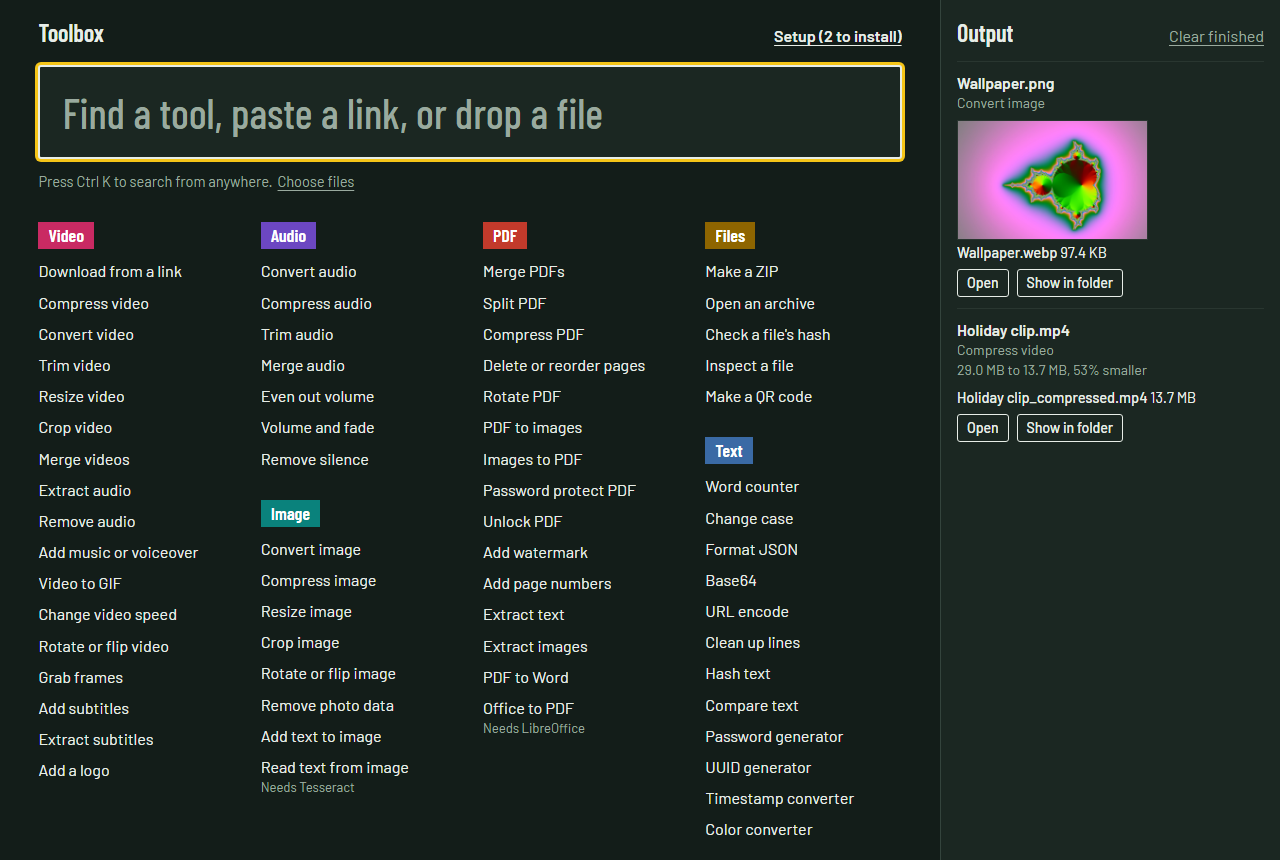
68 tools, one search box.
Type what you want to do, paste a video link, or drop a file, and Toolbox shows the right tool.
- Download from a link YouTube and 1,000+ sites
- Compress video by quality or exact size
- Convert video
- Trim video
- Resize video
- Crop video 9:16, square and more
- Merge videos
- Extract audio
- Remove audio
- Add music or voiceover
- Video to GIF
- Change video speed
- Rotate or flip video
- Grab frames
- Add subtitles
- Extract subtitles
- Add a logo
- Convert audio
- Compress audio
- Trim audio
- Merge audio
- Even out volume
- Volume and fade
- Remove silence
- Convert image including HEIC and AVIF
- Compress image to a size limit
- Resize image
- Crop image
- Rotate or flip image
- Remove photo data
- Add text to image
- Read text from image
- Merge PDFs
- Split PDF
- Compress PDF
- Delete or reorder pages
- Rotate PDF
- PDF to images
- Images to PDF
- Password protect PDF
- Unlock PDF
- Add watermark
- Add page numbers
- Extract text
- Extract images
- PDF to Word
- Office to PDF
- Sign PDF draw, type or add your signature
- Digitally sign PDF with a certificate
- Make a signing certificate
- Check PDF signatures
- Make a ZIP
- Open an archive
- Check a file's hash
- Inspect a file
- Make a QR code
- Word counter
- Change case
- Format JSON
- Base64
- URL encode
- Clean up lines
- Hash text
- Compare text
- Password generator
- UUID generator
- Timestamp converter
- Color converter
Install help
A warning on first launch is expected.
Toolbox isn't code-signed yet, which costs money every year. So Windows and macOS show a warning the first time you open it. Here's how to get past it once.
Windows 10 and 11
- Run the setup file you downloaded.
- If you see "Windows protected your PC", click More info, then Run anyway.
- Toolbox installs for your user only. It doesn't ask for admin rights.
To uninstall, open Settings, then Apps, then Toolbox.
Mac with Apple Silicon
- Open the downloaded .dmg and drag Toolbox to Applications.
- Open Toolbox. When macOS says it can't verify the app, click Done.
- Open System Settings, then Privacy & Security, scroll down and click Open Anyway next to Toolbox, then confirm.
Needs an M1 or newer chip. Macs with Intel chips aren't supported yet.
Downloads
All downloads
Every version, with checksums and the source code, is on GitHub Releases.
| File | Size |
|---|
Only download videos and audio you own, that are openly licensed, or that you have permission to save. Downloading can break a site's terms or copyright law.